


ISSN : 0976-7061
EISSN : 0976-707X



BHAGAT P.R.1*, PAWAR G.A.2
1M & J Western Regional Institute of Ophthalmology, Civil Hospital, Ahmedabad- 380 016, Gujarat, India.
2M & J Western Regional Institute of Ophthalmology, Civil Hospital, Ahmedabad- 380 016, Gujarat, India.
* Corresponding Author : dr.purvibhagat@yahoo.com
Received : 26-09-2013 Accepted : 07-10-2013 Published : 10-10-2013
Volume : 4 Issue : 1 Pages : 65 - 69
J Clin Res Lett 4.1 (2013):65-69
DOI : http://dx.doi.org/10.9735/0976-7061.4.1.65-69
Conflict of Interest : None declared
Computer vision syndrome is an upcoming cause of morbidity in people who use computers for prolonged time. It is characterised by ophthalmic and orthopaedic symptoms. It has a multifactorial etiology. The basic ocular pathology is the stress on ciliary muscles and excess and abnormal accommodation. The patients complain of eye fatigue, burning, tiredness of eyes, neck pain, headache and often blurred vision. The symptoms are often so severe as to compel the patient to visit an ophthalmologist. Treatment is in form of appropriate refractive correction and generous use of lubricants to combat the dry ocular surface. But the most effective way of management is to improve the ergonomics, and the working conditions while using computers or similar devices. The basic aim to provide a review on this topic is to emphasise the importance of this syndrome which is becoming commoner day by day due to the ever growing use of monitor devices but yet fails to receive enough attention.
computer vision syndrome, computer use, computer related problems, dry eyes, ergonomics, blinking.
Computer vision syndrome.
A major technological leap that has taken place in the last century is the invention of the microchip and the computer technology. Computers have become an integral part of our day to day life. Record maintenance, communication, finance, health system, education, entertainment, almost every field uses computers. But with the excessive use of this technology, come certain hazards. The biggest impact the computers have is on the eyes and the ergonomics of the human body. The effect on the eyes is now so accepted and versatile that an entity has come to be established which is known as “Computer Vision Syndrome”.
Both visual and ophthalmic symptoms occur among computer users. These have collectively been called the computer vision syndrome (CVS). By definition, it is a temporary condition resulting from focusing the eyes on a computer for long, uninterrupted periods of time.
According to the National Institute of Occupational Safety and Health, computer vision syndrome affects 90% of the people who spend three hours or more a day at a computer [1] .
According to the United States Bureau of Labor Statistics, 100 million people use computers daily at work in the United States [2] .
The National Centre for Education Statistics reported that 95% of schools and 62% of all classrooms in the United States have had computers since 1999 [2] .
According to Thompson, the prevalence of ocular symptoms in computer users, as part of the syndrome, ranges from 25-93% [3] .
Studies by Sheedy and co-workers suggest that 1 out of 6 patients requiring eye examinations have computer-related eye problems [4] .
Hales and co-workers reported that approximately 22% of computer workers have musculoskeletal problems, such as neck problems, back problems, shoulder problems, and/or carpal tunnel syndrome [5] .
40% of teachers use computers for instruction, and at least one computer is in 97% of all American classrooms.
Without proper vision correction, worker productivity can decrease by as much as 20% [6] .
Workers in western countries spend 6 hrs. using a computer, what gives 1548 hrs. yearly.
16 new patients of CVS are treated each month by Ophthalmologists.
The human eye responds very well to images that have well-defined edges with good contrast between the background and letters and also to most printed material that consists of solid black letters on a white background. Characters displayed on a computer screen are made up of many pixels which are brightest in the center, with the brightness decreasing towards the outer edges. When a light meter with a very small aperture is passed across a pixel, with the light amplitude being charted against the horizontal location, the pixel shows a bell-shaped curve (Gaussian), while the same light amplitude graph of a printed character forms an almost perfect square wave [Fig-1] .
The eyes often have difficulty in focusing on pixel characters. They focus on the plane of the computer screen, but are unable to sustain that focus. So they focus on the screen and relax to a point behind the screen which is called the Resting Point of Accommodation (RPA) or dark focus. The RPA is different for every individual, but for almost everyone, it is further away than the working distance to the computer. The working distance is the distance from the computer user's eyes to the front of the screen. So, the eyes are constantly relaxing to the RPA, and then straining to refocus on the screen [Fig-2] .
This constant flexing of the ciliary muscles leads to fatigue, burning and tiredness of eyes. Studies have shown that there is a significant difference in the requirement of glasses required for focusing on a standard printed near card (e.g. Snellen card) and those for focusing on the image of a typical computer screen, both at a viewing distance of 20 inches [7] .
The symptoms are not only associated with use of computers but also with the excessive use of mobiles, iPad, kindle and watching 3D movies as the mechanism of eye strain is same.
The aetiology of CVS is multifactorial.
Computer users gaze at the computer monitor at a distinct angle of gaze. This happens because of the wide variety of workstations and desk settings used.
Many patients with CVS complain of light sensitivity, which is worsened by high watt fluorescent or flickering lights place at the workstation.
Acuity reserve is the ratio of given print size to visual acuity threshold for identifying letters. It quantifies the amount by which given text exceeds threshold. Research done by Sheedy shows it to be 3:1 for hard text in lower case whereas it is around 2:1 for iPhone [8] . This signifies higher potential of human eye to identify hard text with lesser accommodative effort.
Previous studies have shown that females tend to have a reduction in the tear film's aqueous layer with increasing age, as compared to males.
Visual symptoms such as blurred vision, occurring due to uncorrected refractive errors may be further aggravated by the CVS which adds to the fatigue. Elderly computer users who are also presbyopic suffer due to the same reason.
Working for prolonged non-interrupted periods of time, looking at the computer monitor is a risk factor that may also lead computer users to have eye symptoms. Patients with pre-existing dry eyes may have exacerbated ophthalmic symptoms when using a computer [9] .
Whereas this syndrome is also associated with reduced blink rate, the completeness of blink is also equally important. So patients must be advised to blink frequently and fully [10] .
Computer users who have presbyopia and dry eye (personal factors), who gaze at the monitor with an extended neck (environmental factor) may have strong symptoms associated with this syndrome.
The symptoms are mainly divided into four categories : asthenopic, ocular surface related, visual and extra-ocular [Fig-3] [11] :
• Eye Fatigue with a feeling of tiredness in eyes: 64.95%
• Eye Strain: 48.83%
• Headache: 45.68%. It occurs due to glare from the screen or improper lighting conditions in the room.
• Neck / Shoulder Pain: 44.0%
• Irritation of Eyes: 37.5%
• Itching / Burning 0f Eyes: 34.38%
• Back Pain: 34.38%
• Blurred vision: 30.48%. It occurs due to inability of eyes to steadily focus on the computer screen for a prolonged period or due to constant change of focus between the keyboard and computer screen.
• General Fatigue: 25.58%
• Tension: 25.16%
• Arm / Wrist / Shoulder Pain: 25.0%
• Tearing: 14.78%
• Previous prescriptions of glasses and eye medications, including lubricants, should be evaluated.
• Best-corrected visual acuity for near, intermediate, and distance vision should be checked.
• A cycloplegic refraction is of utmost importance in the younger population (< 21 years) because young computer users may often have refractive errors, particularly latent hyperopia that might lead to visual symptoms as part of the syndrome.
• A meticulous slit lamp examination to evaluate tear meniscus, corneal staining and any subtle signs of dry eye or any ocular surface disorder should be carried out.
• A review for xerostomia, thyroid disease, menopause, arthritis, carpal tunnel syndrome, Parkinson disease, and systemic medications that may exacerbate dry eye symptoms (eg, anticholinergics, antihistamines, antidepressants, diuretics) is also necessary.
• Environmental factors, such as computer setup, seating, wrist position, monitor type (cathode ray tube vs plasma), desktop color, window proximity, and ceiling and desk illumination sources, should be evaluated.
The general environmental evaluation in patients with CVS includes the following
• Angle of Gaze
Studies have suggested that the angle of gaze is the most important risk factor that leads computer users to develop CVS.
Symptoms associated with this syndrome are diminished when computer users gaze downward at angles of 14 degrees or more [2] .
• Estimate Room Humidity and Room Luminance.
• One way to accurately diagnose and identify computer vision problems is by using the PRIO diagnostic instrument that simulates a computer screen. The PRIO tester is set at the distance that the patient works on their computer and the prescription is measured at that distance. Standard reading glasses in most cases are not enough. Because eyes react differently to the stimulus of a computer, 70-75% of the computer users need special computer eyeglasses. Even contact lens wearers sometimes need computer glasses over their contacts [2] .
• Refractive error
• Presbyopia
• Blepharitis
• Allergic Conjunctivitis
• Dry Eye Syndrome
• Lagophthalmos
Tear electrophores may be used when available as a tool for the diagnosis of tear film impairment in high-risk groups such as computer users.
A hormonal evaluation, such as a thyroid profile and sex hormones, may be useful to diagnose metabolic risk factors leading patients to develop CVS.
X-ray films of the neck may be needed to evaluate cervical vertebral curvature straightening in patients with neck pain. Orthopaedic consultation to evaluate the possibility of neck problem or carpal tunnel syndrome should be done.
Luminance evaluation conducted at the workplace is also often advised.
Some important factors in preventing or reducing the symptoms of CVS relate primarily to the computer and its method of use. This includes lighting conditions, chair comfort, location of reference materials, position of the monitor, and the use of rest breaks [Fig-4] [7]
Chairs should be comfortably padded. Chair height should be adjusted so the feet rest flat on the floor. If the chair has arms, they should be adjusted to provide arm support while one is typing. The wrists shouldn't rest on the keyboard when typing.
Most people find it more comfortable to view a computer when the eyes are looking downward. Optimally, the computer screen should be 15 to 20 degrees below eye level (about 4 or 5 inches) as measured from the center of the screen and 20 to 28 inches from the eyes [12] .
These materials should be located above the keyboard and below the monitor. If this is not possible, a document holder can be used beside the monitor to avoid movement of the head to look from the document to the screen.
The computer screen should be positioned to avoid glare, particularly from overhead lighting or windows. Blinds or drapes on windows should be used and light bulbs in desk lamps should be replaced with bulbs of lower wattage.
Screen glare filters which decrease the amount of light reflected from the screen can also be useful.
A break for 15 minutes after every two hours of continuous computer use is advisable. Follow the “ 20-20-20 ” rule i.e. for every 20 minutes of computer viewing, look at a distance of 20 feet for 20 seconds to give the eyes a chance to refocus [13] .
To minimize the chances of developing dry eye when using a computer, make an effort to blink frequently which will keep the ocular surface moist.
Education of employers and school administrators to conduct luminance and humidity evaluations at the workplace and regarding proper use of the computer workstation may go a long way in preventing the side effects of excessive computer use.
The simplest solution is to use glasses that would work for the specific computer distance. Inexpensive versions are available over the counter, as are clip-ons and inserts with other glasses but these are not preferable as they do not correct for astigmatism.
These lenses have a large upper portion for intermediate range and a lower area for close-up.
Progressive lenses that start from +0.01 to +0.60 can be used to reduce the effort of accommodation.
These are fairly new, and to date, most are divided into portions for distance and close-range viewing, like bifocals, and don't work as well for computer and other intermediate-range tasks.
Some people who need help seeing at far and near ranges may opt to wear one contact lens set for each distance but this is not practically feasible and may turn out to be an expensive affair.
Lasik and other forms of corrective surgery fix refractive problems such as near-sighted or far-sightedness, but not the focusing problems that come with age.
Multifocal and accommodative intra-ocular lenses can help to focus on distant, near and intermediate distances.
It is often needed to alleviate the dry eye symptoms. The main drugs used are:
• Topical lubricants to treat the dry eye
• Cyclosporine A ophthalmic emulsion in severe cases
Punctal occlusion to prolong the contact time of the drugs with the ocular surface.
CVS is now becoming a common entity nowadays and its mention is made even in other branches of medicine. According to Ayurveda, CVS is Vata-Pitta vitiation pathology and needs to be managed by lubricating (Snigdha) and rejuvenating (Rasayana) measures, both locally and systemically [14] .
Orthopaedic and physical therapy evaluation is crucial in the diagnosis and treatment of cervical myositis and carpal tunnel syndrome in patients with this syndrome.
Since several ergonomic factors may contribute to CVS, engineer consultation is also desirable at the workplace, including luminance evaluation of the working area.
Complications in patients with CVS are similar to those in patients with dry eye, including superficial punctate keratitis and keratitis.
Watch for optical decentration in eyeglasses by examining the patient's pupillary distance (PD).
CVS is now accepted in medical literature as a unique entity. A high index of suspicion for the condition is warranted in all computer users presenting with characteristic symptoms, though it is usually a diagnosis of exclusion [15] . Proper ergonomics, early evaluation, diagnosis, and intervention may prevent the symptoms associated with CVS.
[1] Beck M. (2010) Becoming a Squinter Nation, Wall Street Journal.
» CrossRef » Google Scholar » PubMed » DOAJ » CAS » Scopus
[2] Izquierdo N., Townsend W., Sheppard J.D.Jr. (2012) Computer Vision Syndrome, Medscape.
» CrossRef » Google Scholar » PubMed » DOAJ » CAS » Scopus
[3] Thomson W.D. (1998) Ophthalmic and Physiological Optics, 18(2), 111-119.
» CrossRef » Google Scholar » PubMed » DOAJ » CAS » Scopus
[4] Sheedy J.E., Shaw-McMinn P.G. (2003) Diagnosing and Treating Computer-related Vision Problems. Elsevier Health Sciences.
» CrossRef » Google Scholar » PubMed » DOAJ » CAS » Scopus
[5] Hales T.R., Sauter S.L., Peterson M.R., Fine L.J., Putz-Anderson V., Schleifer L.R., Ochs T.T., Bernard B.P. (1994) Ergonomics, 37(10), 1603-1621.
» CrossRef » Google Scholar » PubMed » DOAJ » CAS » Scopus
[6] Gary Heiting (2010) Worker Productivity and Computer Vision Syndrome.
» CrossRef » Google Scholar » PubMed » DOAJ » CAS » Scopus
[7] Watt W.S. (2003) Computer Vision Syndrome and Computer Glasses.
» CrossRef » Google Scholar » PubMed » DOAJ » CAS » Scopus
[8] Sheedy J.E., Hayes J.R., Engle J. (2003) Optometry Vision Science, 80(11), 732-739.
» CrossRef » Google Scholar » PubMed » DOAJ » CAS » Scopus
[9] De Paiva C.S., Pflugfelder S.C. (2008) Arquivos Brasileiros de Oftalmologia, 71(6), 89-95.
» CrossRef » Google Scholar » PubMed » DOAJ » CAS » Scopus
[10] Portello J.K., Rosenfield M., Chu C.A. (2013) Optometry and Vision Science, 90(5), 482-487.
» CrossRef » Google Scholar » PubMed » DOAJ » CAS » Scopus
[11] Blehm C., Vishnu S., Khattak A., Mitra S., Yee R.W. (2005) Survey of Ophthalmology, 50(3), 253-262.
» CrossRef » Google Scholar » PubMed » DOAJ » CAS » Scopus
[12] Chiva A. (2011) J. Med. Life, 4(3), 228-233.
» CrossRef » Google Scholar » PubMed » DOAJ » CAS » Scopus
[13] American Optometric Association (2013) Protecting Your Vision, Computer Vision Syndrome.
» CrossRef » Google Scholar » PubMed » DOAJ » CAS » Scopus
[14] Dhiman K.S., Ahuja D.K., Sharma S.K. (2012) AYU Journal, 33(3), 391-395.
» CrossRef » Google Scholar » PubMed » DOAJ » CAS » Scopus
[15] Bali J., Navin N., Thakur B.R. (2007) Indian J. Ophthalmol., 55, 289-93.
» CrossRef » Google Scholar » PubMed » DOAJ » CAS » Scopus
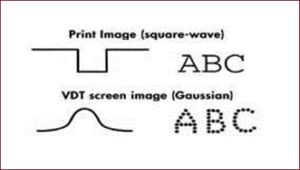 | Fig. 1- Light amplitude graph across a printed character and across a pixel. |
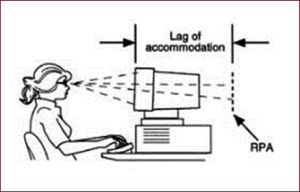 | Fig. 2- Resting point of accommodation |
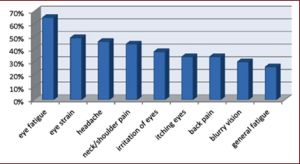 | Fig. 3- Symptoms of computer vision syndrome |
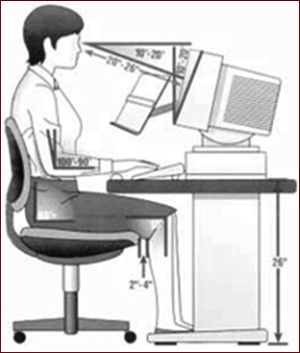 | Fig. 4- Ergonomics during computer use. |